Our experts take the time to understand your needs, tailor your experience, and help you achieve your potential – that’s the edison365 way!
We’ll handle the software setup, admin training, and more, while you focus on what you do best.
We’ll help your team see all the amazing things they can achieve with edison365, encouraging adoption.
Our consultants offer unmatched 1-on-1 support, training programs tailored to your needs, and the right tools to showcase value from the get-go.
We’ve put together four packages to help you get the most out of edison365.
Don’t worry, we’ll help you choose the package that best aligns with the needs of your business.
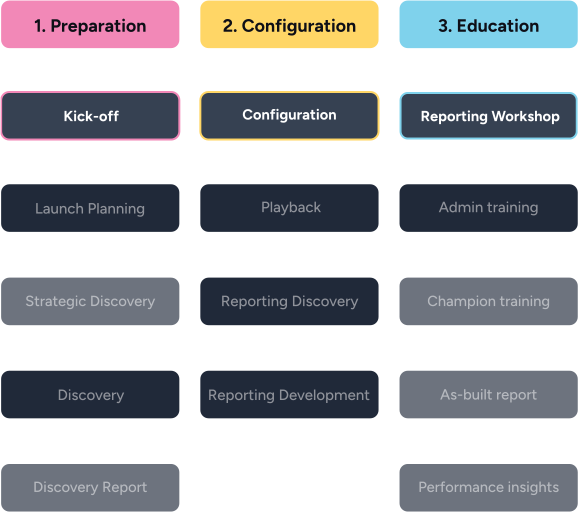
The package for go-getters! Our experts will show you the ropes and walk you through admin functions and analytics. Perfect for teams who want to configure edison365 themselves, all while grasping the basics to suit their needs.
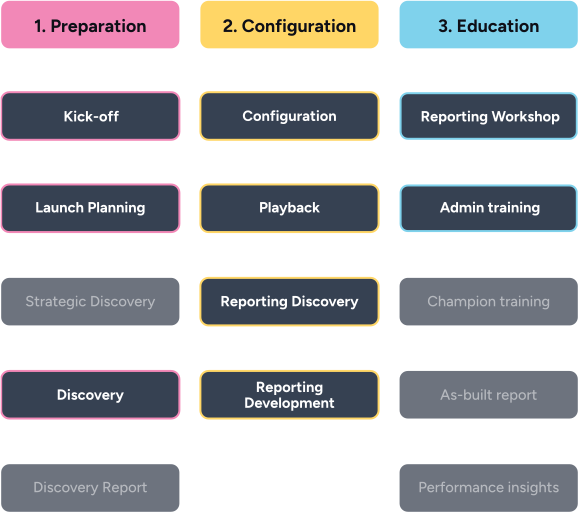
Know exactly what you need? Let our experts tailor edison365 for you, just like they’ve done for 100+ customers. Custom reporting, app configuration, and team training are all included. Be impactful from the get-go and leverage everything edison365 has to offer.
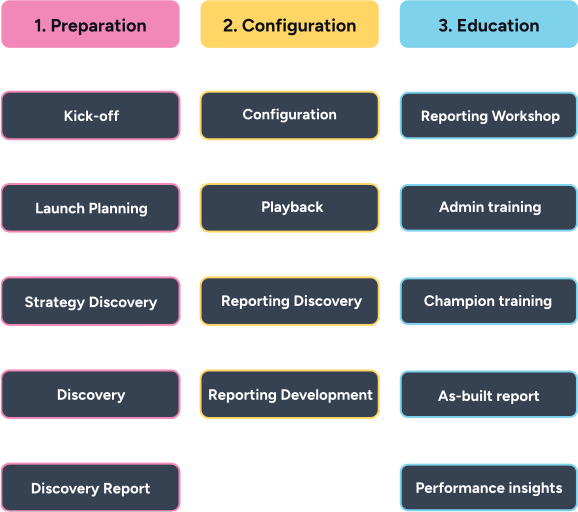
Want to migrate custom processes or launch new ones? Let our experts handle all the heavy lifting and set up edison365 for you! Drive change, achieve goals, and leverage every tool with no hiccups. With our exclusive Champion Training, your Champions will confidently navigate edison365 like pros.
We can do that, too! Let’s build a custom package to suit your specific needs together.
Here’s a side-by-side comparison of what’s included with our onboarding services packages.
This is a tooltip
Tooltips are used to describe or identify an element. In most scenarios, tooltips help the user understand meaning, function or alt-text.
Your introduction to edison365 and what you can expect going forward.
This is a tooltip
Tooltips are used to describe or identify an element. In most scenarios, tooltips help the user understand meaning, function or alt-text.
Learn the basics – what features are available and how they work.
This is a tooltip
Tooltips are used to describe or identify an element. In most scenarios, tooltips help the user understand meaning, function or alt-text.
Discussing, analyzing, and reviewing your current strategy.
This is a tooltip
Tooltips are used to describe or identify an element. In most scenarios, tooltips help the user understand meaning, function or alt-text.
Diving into requirements and understanding preferences, so we can configure your platform.
This is a tooltip
Tooltips are used to describe or identify an element. In most scenarios, tooltips help the user understand meaning, function or alt-text.
A comprehensive report on your requirements, preferences and goals to ensure we’re on the same page.
This is a tooltip
Tooltips are used to describe or identify an element. In most scenarios, tooltips help the user understand meaning, function or alt-text.
Configuring the platform to satisfy your unique business needs.
This is a tooltip
Tooltips are used to describe or identify an element. In most scenarios, tooltips help the user understand meaning, function or alt-text.
A guided tour of your configured platform.
This is a tooltip
Tooltips are used to describe or identify an element. In most scenarios, tooltips help the user understand meaning, function or alt-text.
Discovering how you’d like to use the data from edison365 to offer reporting insights.
This is a tooltip
Tooltips are used to describe or identify an element. In most scenarios, tooltips help the user understand meaning, function or alt-text.
Showing you what reports we’ve set up for you.
This is a tooltip
Tooltips are used to describe or identify an element. In most scenarios, tooltips help the user understand meaning, function or alt-text.
Checking out reports and understanding how to use them.
This is a tooltip
Tooltips are used to describe or identify an element. In most scenarios, tooltips help the user understand meaning, function or alt-text.
Diving into the admin functions of the platform.
This is a tooltip
Tooltips are used to describe or identify an element. In most scenarios, tooltips help the user understand meaning, function or alt-text.
Exclusive training to upskill select superusers who can do it all (and more) with edison365.
We’ll discuss your goals, walk you through edison365, and help you choose the package that’s right for your business.
“Your capacity to manage our requirements, keep us informed and incredible hands-on approach gives me the confidence that we are partnering with the right team to achieve our short-to-long term goals when it comes to how we manage our pipeline and enhance our processes.”
– Envu
“Everything was well prepared and well explained, with a lot of effort being put in to understand the peculiarities of our current systems and processes so that edison365 could be set up in the best way for us.”
– Infineum
“Your capacity to manage our requirements, keep us informed and incredible hands-on approach gives me the confidence that we are partnering with the right team to achieve our short-to-long term goals when it comes to how we manage our pipeline and enhance our processes.”
– Envu
Get a quick Discovery Session to see why edison365 is the best MS Project Alternative there is, and understand how our experts ensure seamless and quick migration. From pulling in your data from MS Project Online, to helping you get started with edison365, we’ve got you covered!
Chat with our team today and discover just how simple it is to move to edison365, the end-to-end project portfolio management software your team will love using to drive results.
That’s right! Techint E&C quickly waved goodbye to their Sharepoint-based system when they met edison365.
After a quick, seamless migration, they’ve been set up with successful business cases, and an ideation model that’s already making a measurable impact.
All set up? Let’s keep winning together!
Our experts offer continuous support through carefully curated strategic success services to help you consistently achieve more with edison365.
The edison365 Onboarding and Implementation services are designed with users like you in mind. It focuses on helping businesses configure, deploy, and adopt edison365, in a structured and optimized way.
From understanding your needs and configuring the platform accordingly, to setting it up and migrating your data, our experts do it all for you!
The edison365 Onboarding and Implementation services are designed with users like you in mind. It focuses on helping businesses configure, deploy, and adopt edison365, in a structured and optimized way.
From understanding your needs and configuring the platform accordingly, to setting it up and migrating your data, our experts do it all for you!
You’ll find everything you’ll ever need to get the best from edison365 at our Help Centre.
Explore our collection of resources which include latest templates, checklists and guides to business transformation.
Our exceptional Expert Advisors are professionals with expertise in the world of innovation, PMO, PPM, and more.
Get in touch with our friendly team for all things business transformation
Register your interest to join our partner program and discover new ways to grow your business!
See exactly how edison365 helps business transform with a free trial
Get in touch with our friendly team for all things business transformation